fleetfaxProfleetfax Pro · Standard price$69, now $39/month founding price* · Offer ends Oct 31$39/month* · Ends Oct 31 · See Pro →

*While supplies last

Skip to content
fleetfax
Source Find carriers on a laneCarriers seen running the lane you type Find carriers near a cityCarriers based within a radius of one city Carrier directoryActive carriers by state and city.
Vet Carrier reportThe whole federal record in one report Search by phone or emailFind which carriers share a phone number or email Custom policyCheck any carrier against the starter policy, or your own rules on Pro Bulk vettingProPaste up to 200 carriers and check them all at once Graph explorerProWho a carrier shares officers, phones and addresses with
Monitor Your bookOne row per carrier, flagged when its record changes Change alertsKnow when a carrier you watch changes Carrier historyProWhat changed on a carrier, and when Do-not-use listCarriers you’ve ruled out, flagged everywhere
Chrome extension Look up a carrier from any page in Chrome
Research
The thief books the loadCargo theft has gone white-collar: the load is stolen on paper, with a borrowed identity, a purchased MC number, or a hijacked FMCSA registration account.8 min read When the record goes quietFMCSA's new public feeds can drop insured carriers with no marker. About 1 in 18 reading “lapsed” were insured all along when checked live.6 min read Reopened, not reformedNew carriers that share details with one shut down for cause are 3.6 times as likely to already have a crash on record.4 min read
All research →
Resources

Guides

How to vet a carrierWhat the federal record shows about a carrier before you book USDOT vs MC numbersWhat each number is and when a carrier needs one GlossaryPlain definitions of FMCSA terms FAQAnswers about fleetfax and the data behind it

Trust

How fleetfax reads the recordWhere each field comes from and what its date means How the ranking worksWhat sets the order. Carriers can’t pay to rank higher Risk flagsFraud patterns checked on every report
Tools

Compare

Compare carriersTwo or three carriers side by side, row by row

Live data

Daily changesNew carriers, authorities, and revocations, counted daily. Out-of-service trackerNational vehicle and driver out-of-service rates from roadside inspections. Fleet age trackerThe age of power units seen in recorded inspections.

Status

Site statusWhether fleetfax is up, and how fresh its carrier data is.
Pricing
Search a carrier⌘K Sign in Start freeGet started free
Sign in Start freeGet started free
Source Find carriers on a lane Find carriers near a city Carrier directory
Vet Carrier report Search by phone or email Custom policy Bulk vettingPro Graph explorerPro
Monitor Your book Change alerts Carrier historyPro Do-not-use list
Chrome extension Pricing
Research
The thief books the load When the record goes quiet Reopened, not reformed All research
Resources
How to vet a carrier USDOT vs MC numbers Glossary FAQ How fleetfax reads the record How the ranking works Risk flags
Tools
Compare carriers Daily changes Out-of-service tracker Fleet age tracker Site status
Monitor

Know when a carrier you count on changes

Authority revoked, insurance cancelled, an out-of-service order. When it happens to a carrier in your book, fleetfax marks it on that carrier’s row.

Get started free

Up to 15 carriers in your book, 5 monitored. Changes on every carrier show in your account.

Your book

Every carrier in your book, flagged when its record changes

One row per carrier: what the federal record says, what your policy says, and what you actually ran with them: loads, last load, dispatcher. A carrier that cleared onboarding in March can be uninsured by June; the row changes when the record does, and what changed waits for you in your account.

Filter the book by what is wrong with it: blocking, outside your policy, not used in 90 days. Open a row for the finding and the rule that decided it, switch to the map, or put three carriers side by side.

Changes show in your account.
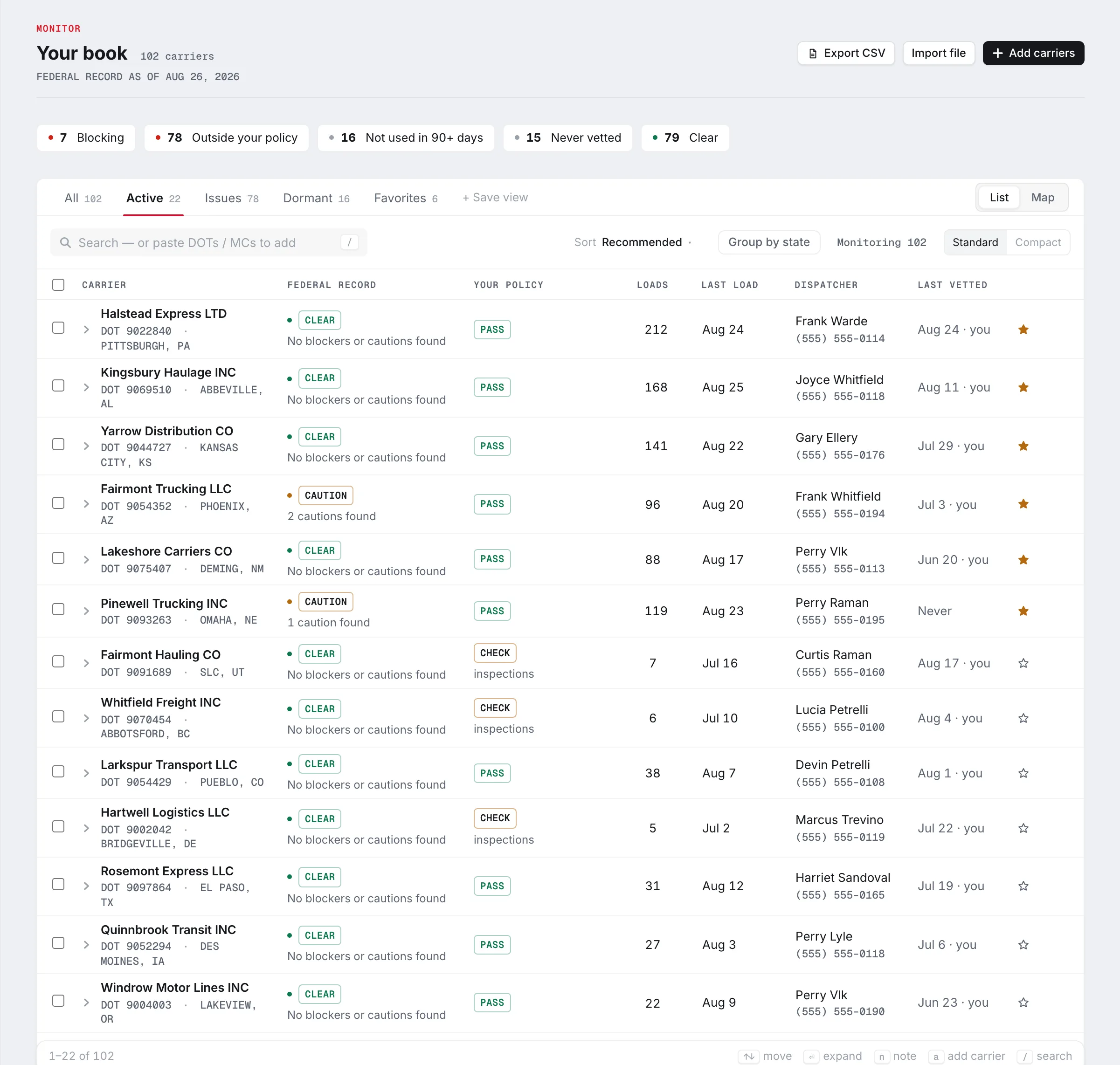
The fleetfax book: 100 carriers, the federal record checked the day before, a folded line reading 4 carriers changed since your last visit, 2 blocking and 1 to check; facet chips counting 6 blocking, 16 cautions, 4 not checked and 74 clear on the federal record, 6 outside the starter policy and 30 not used in 90 days; tabs for All, Active, Needs attention, Dormant and Favorites; then one row per carrier with the federal record result, the starter policy result, loads, last load and dispatcher.

One row per carrier. The federal record's summary on the left, your policy's result beside it, then what you actually ran with them. One click shows only the carriers that are blocking, outside your policy, or not used in 90 days.
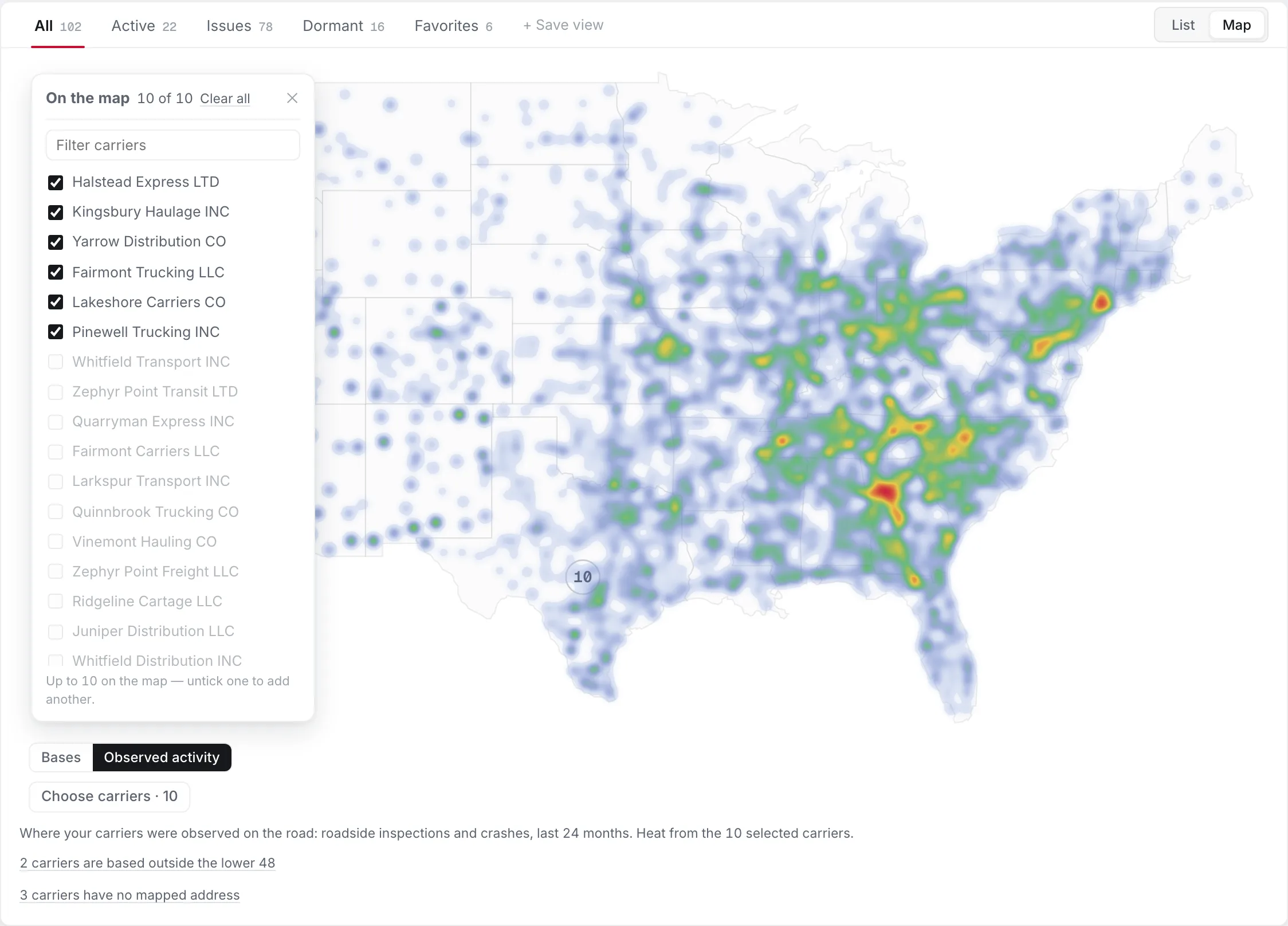
The book's map view: a heat map of the lower 48 built from roadside inspections and crashes over 24 months for the ten most recently used carriers, following the interstates and densest through the Southeast and the Northeast, with a switch between bases and observed activity and a button to choose which carriers are on the map.

Where your carriers were observed. The same book as a map: heat from roadside inspections and crashes over the last 24 months, drawn from where the trucks were stopped, not from a service area typed into a form. Pick up to ten carriers at a time.
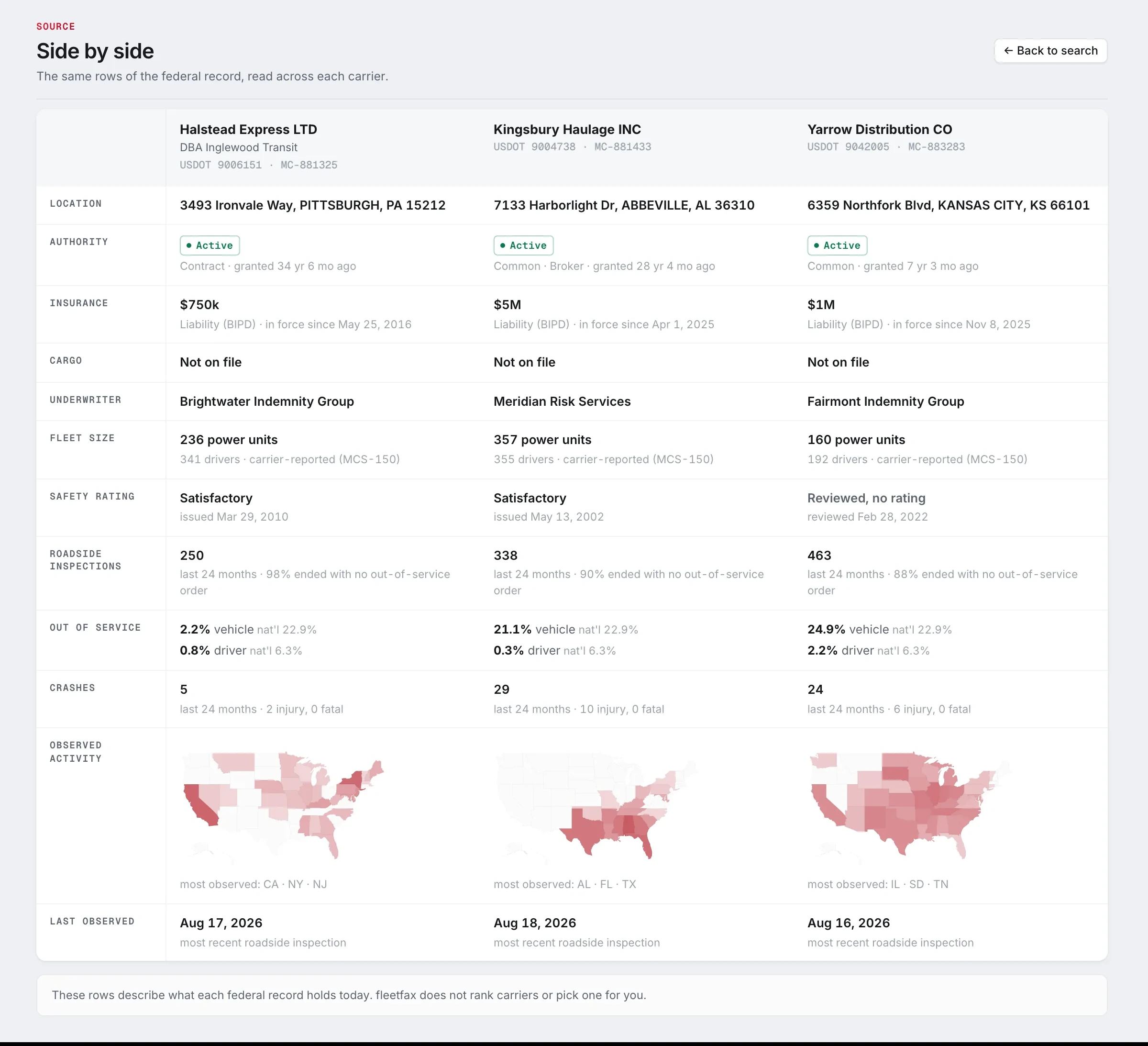
Three carriers side by side: the same rows of the federal record read across each one, a findings summary, location, authority, insurance, cargo, underwriter, fleet size, safety rating, roadside inspections, out-of-service rates, crashes, a small map of observed activity, and the date last observed.

Three at once. Pick carriers from the book and read the same rows of the federal record across each of them.
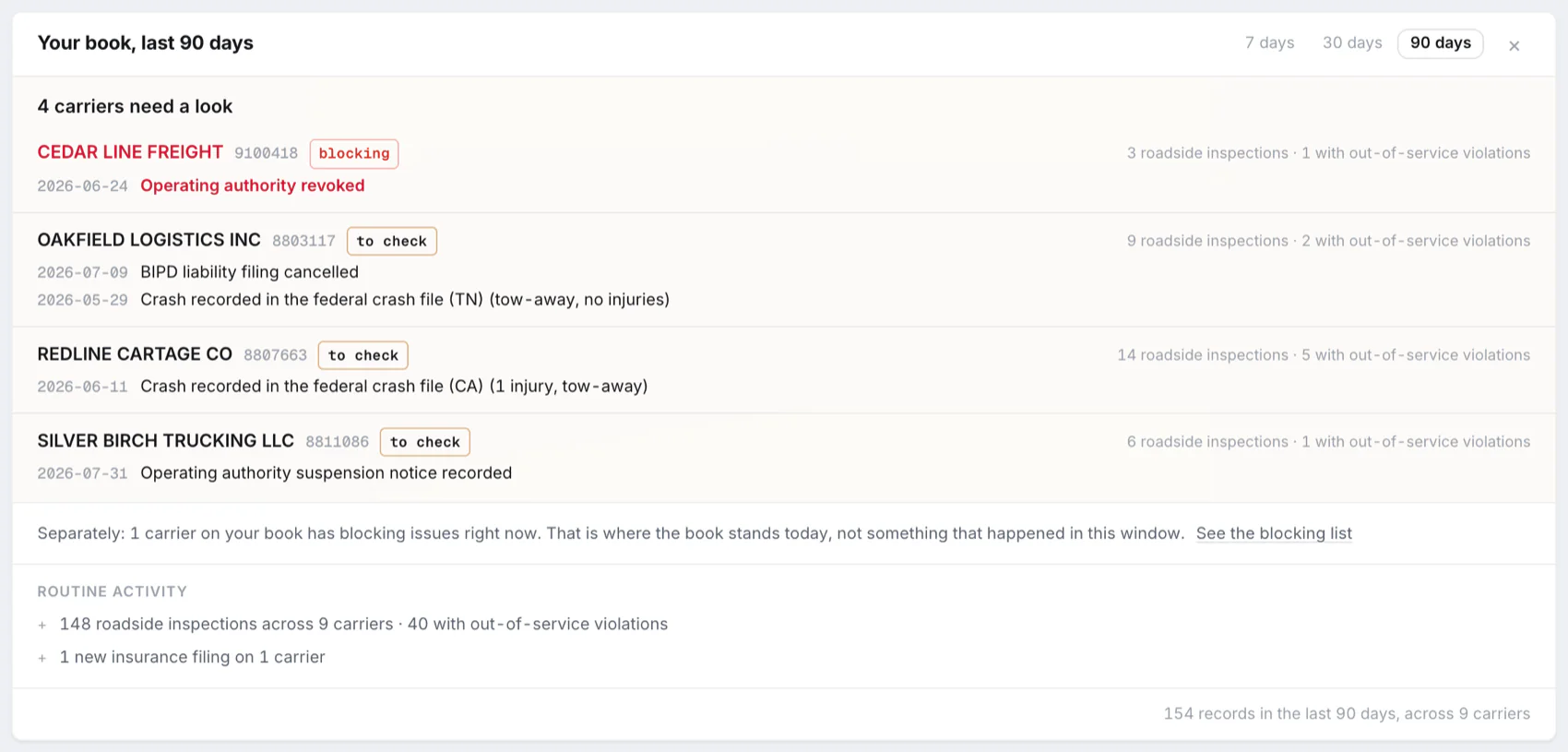
The Since your last visit card at the top of a book: last visit Oct 7, 4 of 100 carriers changed, 2 blocking. Blocking changes name an authority revoked and a liability filing no longer on file, each with Open report and Mark do-not-use; a change to check names a contact information change; a routine change names a truck count change. Each line carries the day it was detected. Below, a count of the other carriers blocking right now and buttons to show only these 4 in the table or mark all as seen.

What changed on your book. Since your last visit, on one card: the carriers with a blocking change first, then the changes to check, then the routine ones, each with the day it was detected.

Carrier history

See what changed, and when

The History tab shows what changed in a carrier's FMCSA record: address, phone and email, name and officers, authority status, liability insurance, out-of-service orders, fleet size and hazmat. A free account sees a count per category. Pro shows FMCSA's dated records, and changes with their old and new values.

Product views: every carrier name, number, date and amount is fictional; the layouts and wording are the product’s own.

Monitor your carriers

A free account keeps a book of the carriers you work with. Up to 15 carriers in your book, 5 monitored, and you choose the 5. Changes on every carrier in your book show in your account. Carrier reports are free, with a daily limit, and the first 5 a day need no account.

Get started free

Pro holds up to 200 carriers and shows every change since you added each one. Pro has not opened yet.

fleetfax

Carrier intelligence for all. Source, vet, and monitor your carriers, free.

Product Carrier report Chrome extension Carrier history Graph explorer Bulk vetting Pricing
Free tools Carrier directory SAFER snapshot lookup Carrier vetting MC number lookup DOT number lookup FMCSA safety check
Learn Research Resources Glossary Methodology FAQ
Live data Daily changes Out-of-service tracker Fleet age tracker
Company About Support

© 2026 fleetfax

fleetfax LLC · 2108 N St, Ste N, Sacramento, CA 95816
Privacy Terms Status
fleetfax

How's it going?